FSC-DB200 Bluetooth audio module development board
FSC-DB200 is a Bluetooth audio development board that can be used with Feitong BT1026X, BT1035, BT1036, BT1038, etc. 13mm × 26.9mm 52 Foot stamps are used to encapsulate audio modules.
Through this development board, users can use the module for testing and verification very efficiently.
When used with FeasyBlue APP, SPP and BLE data transmission tests can be performed. Customers can send AT commands to the module through the serial port to read and write parameters, issue control instructions, etc.
Related products
 fsc-bt1026a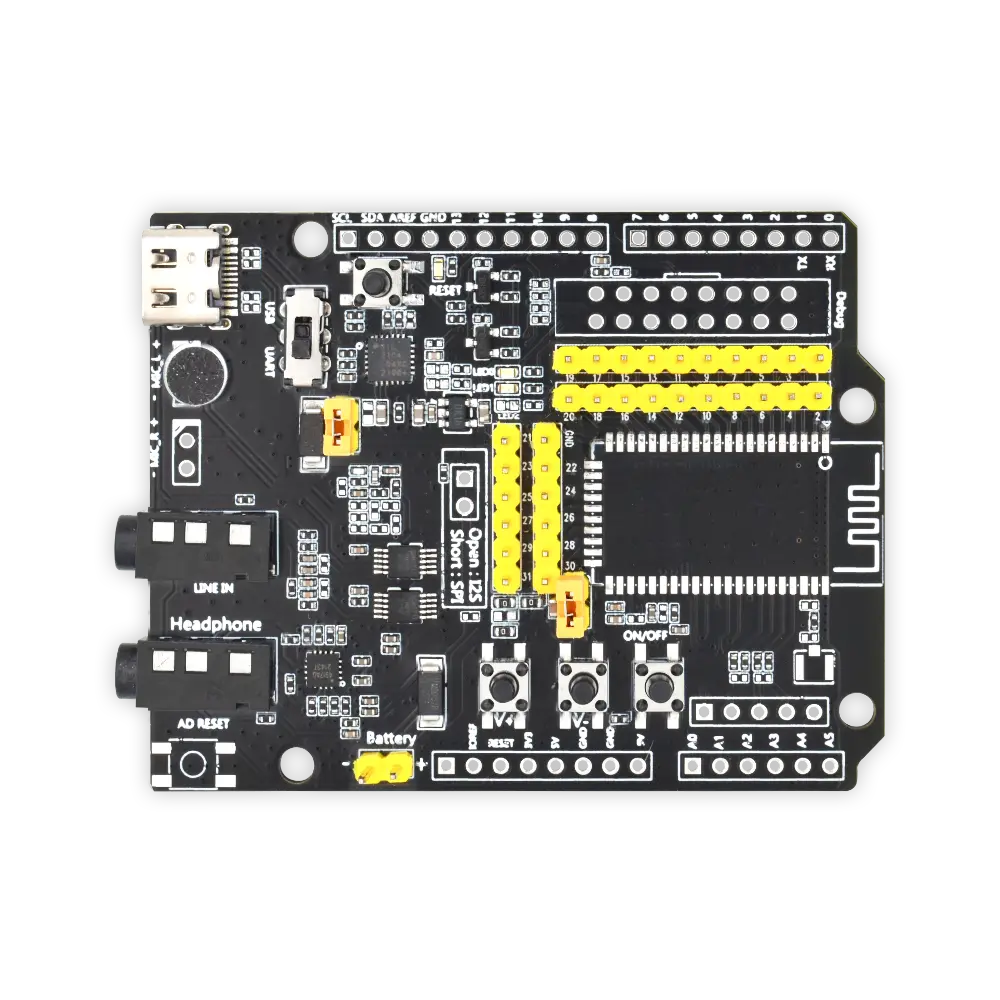
-
-
-
- Development boards for FSC-BT1026X, FSC-BT1035, FSC-BT1036, FSC-BT1038 and other 13mm × 26.9mm 52-pin stamp package modules.
-
- audio interface:
- 3.5mm headphone jack 1, Line_in analog input
- 3.5mm Headphone jack 2, Line_out analog output
- Built-in microphone for convenient call testing
-
- All-in-one Type C USB port functionality:
- powered by
- Charge
- Serial protocol communication
- USB protocol communication
- Other functions and features:
- Battery power supply interface (pin header)
- Button control (power on/off/pause play/volume/up and down) and one-button reset
- 2.54mm spacing pin header, convenient for Dupont line connection
- Multi-function indicator light shows status
- RF interface (non-standard configuration), convenient for testing RF signals
- Built-in USB to serial port chip
- Built-in headphone amplifier chip, can drive 16/32 ohm headphones
- Reserve Adu board connection holes
- All-in-one Type C USB port functionality:
- audio interface:
-
-
| serial number | logo | describe | |
| 1 | Type-C | Power the module/communicate with the module/charge the battery through the module | |
| 2 | USB/UART switching | You can choose UART to communicate with the module, or you can choose the USB function of the module (not all modules have USB function) | |
| 3 | microphone | HFP (used during incoming and outgoing calls, L channel is used by default) and applications that require a microphone | |
| 4 | audio input | Standard 3.5mm audio socket | |
| 5 | Headphone output | Standard 3.5 headphone output, can drive 16/32 ohm speakers, maximum 60mW | |
| 6 | Adu board reset button | Reset the extended Adu board and leave it empty by default. | |
| 7 | battery powered | Lithium battery interface. 3.7V~4.2V. Do not exceed this voltage, otherwise the module will be damaged. | |
| 8 | Add volume | Short press for volume increase/long press for next song | |
| 9 | Volume down | Short press to decrease the volume/long press to go to the previous song | |
| 10 | Power button | Long press to turn on and off, play music: short press to pause/play, incoming call: short press to answer, short press again to hang up. | |
| 11 | Adu board expansion pin header | Adu board extension, empty by default | |
| 12 | Adu board indicator light | Adu board status indication | |
| 13 | Analog audio differential output pin header | Extension foot, empty by default | |
| 14 | External IPEX seat | Module external antenna connection socket | |
| 15 | module | Can support BT806/1006/1026X/958, etc. | |
| 16 | Module pin | Each pin of the module | |
| 17 | TRBI200 | TRBI200 writer interface, empty by default | |
| 18 | Module reset button | Short press module to reset | |
| 19 | Battery charging/module upgrade | Charging the battery in short circuit state, module upgrade/fixed frequency | |
| 20 | Module power supply | Short circuit: Type-C supplies power to the module. Disconnect: The battery supplies power to the module, or the battery is charged when Type-C has input voltage and the "battery charging/module upgrade pin" is short-circuited. | |
| 21 | SPI/I2S selection | Short circuit: SPI, open:I2S is selected based on module function. Not all modules have this function. | |
| 22 | Module indicator light | If the blue light flashes quickly, it means pairing, and if it stays on, it means it is connected. The green light is always on, and the SPP/BLE connection is successful. | |
| Note: Only three combinations can be used to charge the battery. The maximum current is 200mA. Normally, this feature is turned off by default. Not all modules support battery charging。 | |||
Documentation